
JLC
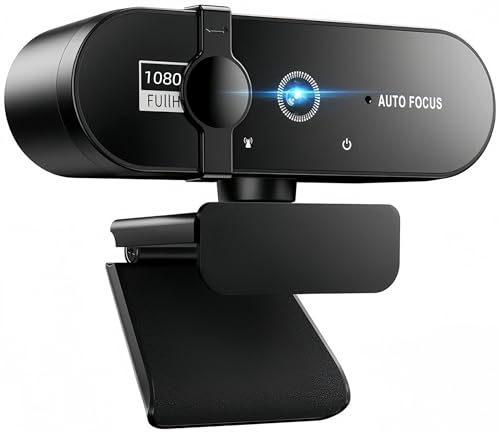
JLC 360 Degree Rotating Auto Focus HD Webcam with Built in Microphone
- Introducing the JLC 360-Degree Rotating Auto Focus HD Webcam with Built-in Microphone – a perfect blend of cutting-edge technology and user-friendly design for anyone seeking enhanced video communication. With a stunning resolution of 1920 x 1080p, every detail comes to life, whether you're in a virtual meeting, streaming your gaming sessions, or connecting with loved ones.
- The advanced CMOS sensor ensures crisp and clear images, while the 30 frames per second frame rate guarantees smooth video playback. The built-in microphone captures your voice with remarkable clarity, ensuring that every word is heard loud and clear.
- One of the standout features of this webcam is its innovative 360-degree rotating base, allowing you to easily adjust the angle for the best possible view. This feature makes it incredibly versatile for various uses – from professional video calls to casual chats, and even presentations where you need to showcase multiple angles.
- With a simple USB 2.0 connection and plug-and-play functionality, getting started is a breeze. The 1.2m cable provides ample length to position the webcam comfortably in any setting. Plus, with flicker control at 50Hz, you can say goodbye to annoying screen flickers that can disrupt your video experience.
- Whether you’re a remote worker, an online educator, or just someone who loves to stay connected, the JLC 360-Degree Rotating Auto Focus HD Webcam is your go-to choice for high-quality video interaction. Elevate your online presence and make every video call a memorable one!
Frequently asked
What is the resolution of the JLC webcam?
The JLC webcam offers a high-definition resolution of 1920 x 1080p, ensuring clear and detailed video quality.
Does the JLC webcam have a built-in microphone?
Yes, it features a built-in microphone that captures audio with excellent clarity, making it ideal for video calls and streaming.
Can the webcam rotate?
Absolutely! The JLC webcam boasts a 360-degree rotating base, allowing you to adjust the angle for the best view during use.
How do I connect the webcam to my computer?
Connecting the JLC webcam is simple. Just plug it into your computer using the USB 2.0 connection, and you’re ready to go!
What is the length of the webcam cable?
The webcam comes with a 1.2m cable, providing enough length for flexible positioning on your desk.
What frame rate does the JLC webcam support?
This webcam supports a frame rate of 30 frames per second (FPS), ensuring smooth video playback during calls and streaming.
You may also like



As an Amazon Associate we earn from qualifying purchases. Links on this page may earn us a commission at no extra cost to you. Prices and availability are taken from Amazon at the time of writing and can change.