Kensington
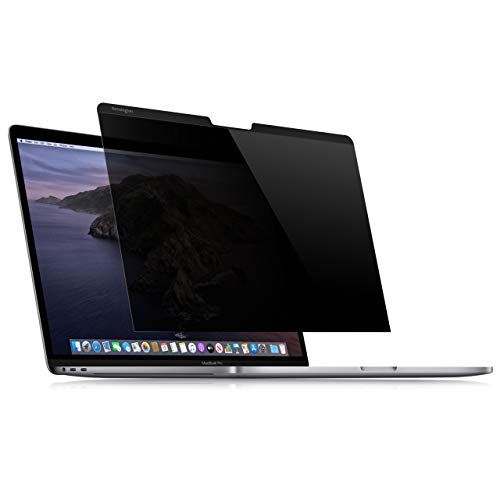
Kensington K64490WW Privacy Filter for MacBook Pro 13 "
- Discover the ultimate in privacy protection with the Kensington Laptop Screen Privacy Filter, designed specifically for Apple MacBook Pro 13-inch models from 2016 to 2019 and the MacBook Air 2018. This innovative privacy screen seamlessly integrates with your device, attaching effortlessly via built-in magnets—no sticky residue to worry about!
- With a limited viewing angle of +/- 30 degrees, this filter ensures that your confidential information remains hidden from prying eyes, making it an ideal choice for working in public places like cafes, libraries, or co-working spaces. Not only does it shield your data, but it also reduces harmful blue light by up to 22%, helping to alleviate eye strain during those long hours spent in front of your screen.
- The Kensington privacy filter is reversible, offering both matte and glossy viewing options to suit your preferences. Included in the package are a cleaning cloth and a screen holder, which keep your filter protected from scratches and dust when not in use. Please note that while the privacy screen attaches magnetically, it may leave a slight gap when the laptop is closed; however, your MacBook will still function normally, going to sleep as needed.
- Whether you're a student, a professional, or anyone who values privacy, the Kensington Laptop Screen Privacy Filter is a smart investment for safeguarding your sensitive information while on the go. Unlock the peace of mind you deserve and elevate your MacBook experience today!
Frequently asked
What models does the Kensington privacy filter fit?
The filter is compatible with 13-inch MacBook Pro models from 2016 to 2019 and the MacBook Air 2018 model. It does not fit the 2022 MacBook Air 13.6" M2 model due to size differences.
How does the privacy filter attach to my MacBook?
The privacy screen filter attaches easily via built-in magnets that are integrated into the MacBook frame, ensuring a secure fit without adhesives.
Can I use the filter in bright light?
Yes, the matte side of the filter helps minimize glare, making it perfect for use in bright environments, while the glossy side enhances colour vibrancy.
Does the filter affect the touch screen functionality?
Since this model is not a touch screen, the filter does not interfere with any touch functionalities. Your MacBook will operate just as it normally would.
Will the filter protect my screen from scratches?
Yes, the Kensington privacy filter not only hides your information but also provides an additional layer of protection for your MacBook screen against scratches and dust.
How do I clean the privacy filter?
Use the included cleaning cloth to gently wipe the surface of the privacy filter. Avoid using harsh chemicals that could damage the filter.
You may also like

As an Amazon Associate we earn from qualifying purchases. Links on this page may earn us a commission at no extra cost to you. Prices and availability are taken from Amazon at the time of writing and can change.